
Obtén todo lo que necesitas de una CDN moderna: desde una escala sin esfuerzo y seguridad integrada hasta control programable y visibilidad total.




UA Spoofing 101: Detection and Defense with Fastly’s Next-Gen WAF
Learn how to detect and defend against User-Agent spoofing. Discover how Fastly’s Next-Gen WAF uses behavioral signals to unmask automated threats and bots.



In today’s web security landscape, a client's "identity" is often just a digital mask. Attackers frequently spoof User-Agent strings – the digital business cards of the web – to bypass security filters, rotate identities, and masquerade as legitimate browsers while performing malicious scrapes or attacks.
This blog explores the mechanics of this deception, demonstrating how easily tools like Python, cURL, and SQLMap can be used to hide automated traffic behind realistic browser headers. More importantly, it reveals how the Fastly Next-Gen WAF moves beyond easily fooled regex filters to unmask these threats. By leveraging SmartParse technology and TLS/JA3 fingerprinting, Fastly analyzes the "DNA" of a request, identifying inconsistencies between what a client claims to be and how it actually behaves.
Introduction: The Identity Crisis
In the world of web security, identity is often an illusion. Every second, your Web Application Firewall (WAF) processes thousands of requests from clients that aren't who they claim to be.
The device sending HTTP requests to your web server and WAF is often not the device it claims to be. These clients are spoofing their User-Agent – the primary field within HTTP headers that provide device information.
What is a User-Agent?
An HTTP User-Agent is a text string sent by a client application (such as a web browser or a script) to a web server as part of an HTTP request header. It acts like a "digital business card" that identifies the software, operating system (OS), and device type making the request.
A typical User-Agent string includes:
Browser Name and Version: e.g.,
Chrome/109.0.0.0Operating System: e.g.,
Windows NT 10.0; Win64; x64Rendering Engine: The software used to display content, e.g.,
AppleWebKit/537.36orGecko.Compatibility Tokens: Legacy strings like
Mozilla/5.0are included in almost all modern browsers for historical compatibility reasons.
Below are some sample User Agents:
Mozilla/5.0 (Windows NT 10.0; Win64; x64) AppleWebKit/537.36 (KHTML, like Gecko) Chrome/109.0.0.0 Safari/537.36Mozilla/5.0 (Macintosh; Intel Mac OS X 10_15_7) AppleWebKit/537.36 (KHTML, like Gecko) Chrome/109.0.0.0 Safari/537.36Mozilla/5.0 (X11; Linux x86_64) AppleWebKit/537.36 (KHTML, like Gecko) Chrome/108.0.0.0 Safari/537.36
Think of it as the "ID card" of the web. When a client lies about this ID, they are spoofing it – effectively wearing a digital mask to hide their true identity.
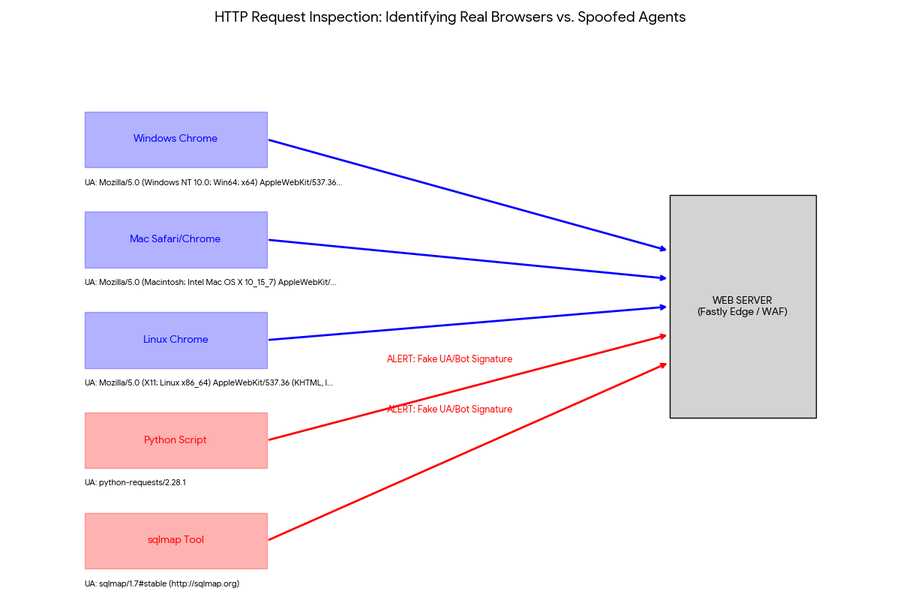
The Deception - What is a Fake User-Agent?
User-Agent spoofing occurs when there is a discrepancy between the UA value in the HTTP header and the actual client making the request. For example:
The Operating System is actually Windows, but it claims to be Linux.
The Browser is actually a script, but it claims to be Chrome or Firefox.

Why Do Attackers Spoof User-Agents?
Spoofing User-Agents in tools like sqlmap, cURL, or python-requests is done primarily to bypass anti-bot protections, WAFs, and security filters that typically block non-browser requests.
By masquerading as a legitimate web browser, attackers can:
Evade Detection: Many websites use security mechanisms to identify and block automated traffic. Default strings like
sqlmap/1.x#stableorpython-requests/2.31.0act as immediate indicators that are easily identified as malicious or automated.Prevent Bans and Restrictions: By rotating User-Agents, automated scripts can mimic multiple unique users. This helps attackers avoid IP bans or rate limits that occur when a single User-Agent generates an abnormally high volume of requests.
Target Mobile vs. Desktop: Spoofing allows attackers to request mobile versions of websites, which are occasionally less protected or contain different data structures than their desktop counterparts.
Common Tools Used for Spoofing
SQLMap: By default, SQLMap uses a very distinct User-Agent. Attackers use the
--user-agentflag to hide their activity, mimicking modern browsers to slip past simple detection systems.cURL: The default
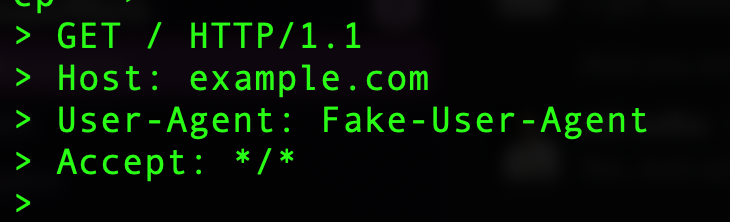
curl/7.x.xstring is frequently blocked by web servers. Users often use the-H "User-Agent: ..."flag to pretend they are a standard web browser.Example 1:
curl -v -A "Fake-User-Agent" https://example.comExample 2:
curl -H "User-Agent: Fake-User-Agent"https://example.com
Python (Requests): Using
headers={'User-Agent': '...'}ensures that automated scraping scripts appear legitimate. As you will see in the next demo, libraries likefake-useragentallow for the automatic rotation of realistic strings to further complicate detection.
headers = {'User-Agent': fake_user_agent}response = requests.get(url, headers=headers)Understanding why attackers spoof is only half the battle; seeing how easily it is implemented reveals the true scale of the challenge.
The "Easy" way to Spoof User-Agent
When I first started this Python project, I wrote a simple script that sent a single static User-Agent string. However, I soon realized that a WAF could easily flag the traffic because the User-Agent never changed.
To improve this, I decided to rotate the User-Agent for every request. I initially used a for-loop to iterate through an array of strings, but the pattern was too predictable.
To make the traffic look more organic, I implemented the random library to select a different agent for each request. I even included strings like curl/7.88.1 to test if the WAF would specifically block common command-line tools."
# User-Agent list
**user_agents** = [
    "Mozilla/5.0 (Windows NT 10.0; Win64; x64) AppleWebKit/537.36 (KHTML, like Gecko) Chrome/109.0.0.0 Safari/537.36",
    "Mozilla/5.0 (Macintosh; Intel Mac OS X 10_15_7) AppleWebKit/537.36 (KHTML, like Gecko) Chrome/109.0.0.0 Safari/537.36",
    "Mozilla/5.0 (Windows NT 10.0; Win64; x64) AppleWebKit/537.36 (KHTML, like Gecko) Chrome/108.0.0.0 Safari/537.36",
    # ... more agents
]

# Request loop
for i in range(num_requests):
    try:
        # Select random UA
        random_user_agent = random.choice(user_agents)
        headers = {'User-Agent': random_user_agent}
        response = requests.get(url, headers=headers)
Command-line interfaces can be a bit dry, so I decided to build a Flask web app to provide a more visual demonstration. Here is the Web user interface, this tool is available on GitHub. Please feel free to use it.
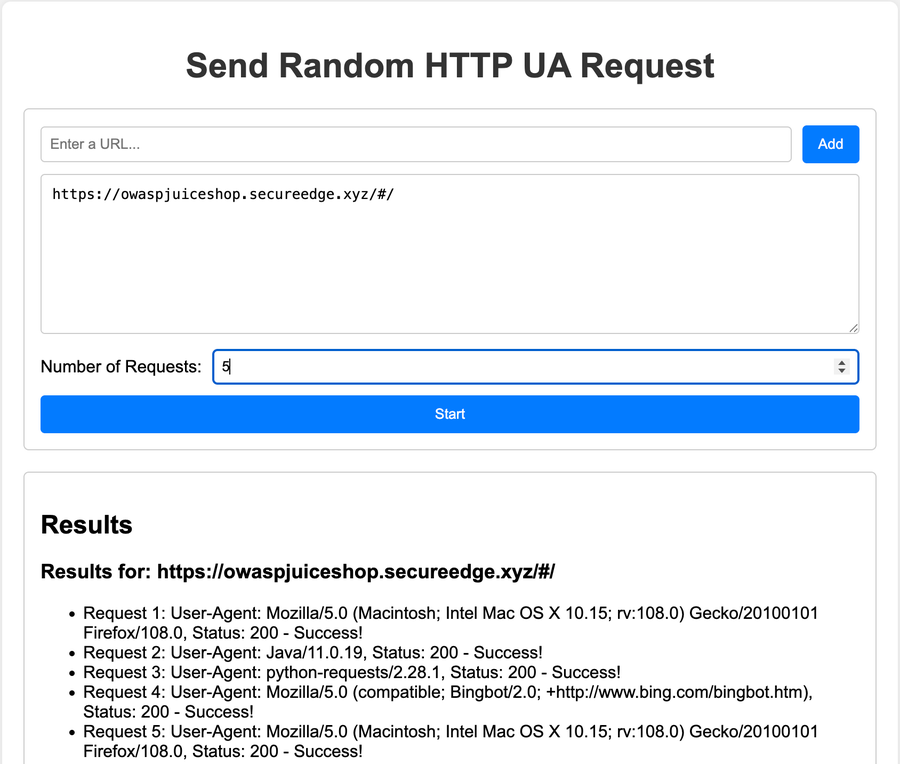
While rotating User-Agents might slip past legacy, regex-based filters, modern defense requires a deeper level of inspection. This is where the Fastly Next-Gen WAF changes the game.
How Fastly WAF Wins - Detect spoofed User agents
The Fastly WAF detects deceitful User-Agents by using intelligent, non-regex SmartParse technology. Instead of relying solely on the User-Agent header, it analyzes request behavior, typically within milliseconds, to identify threats.
How Fastly WAF Identifies and Exposes Spoofed User-Agents
Near Real-Time Monitoring and Visibility: The Overview dashboard reflects attacks and anomalies within 30 seconds. Triggered events are tagged with specific "deception system" signals, which can be monitored in the Fastly console to identify malicious requests.
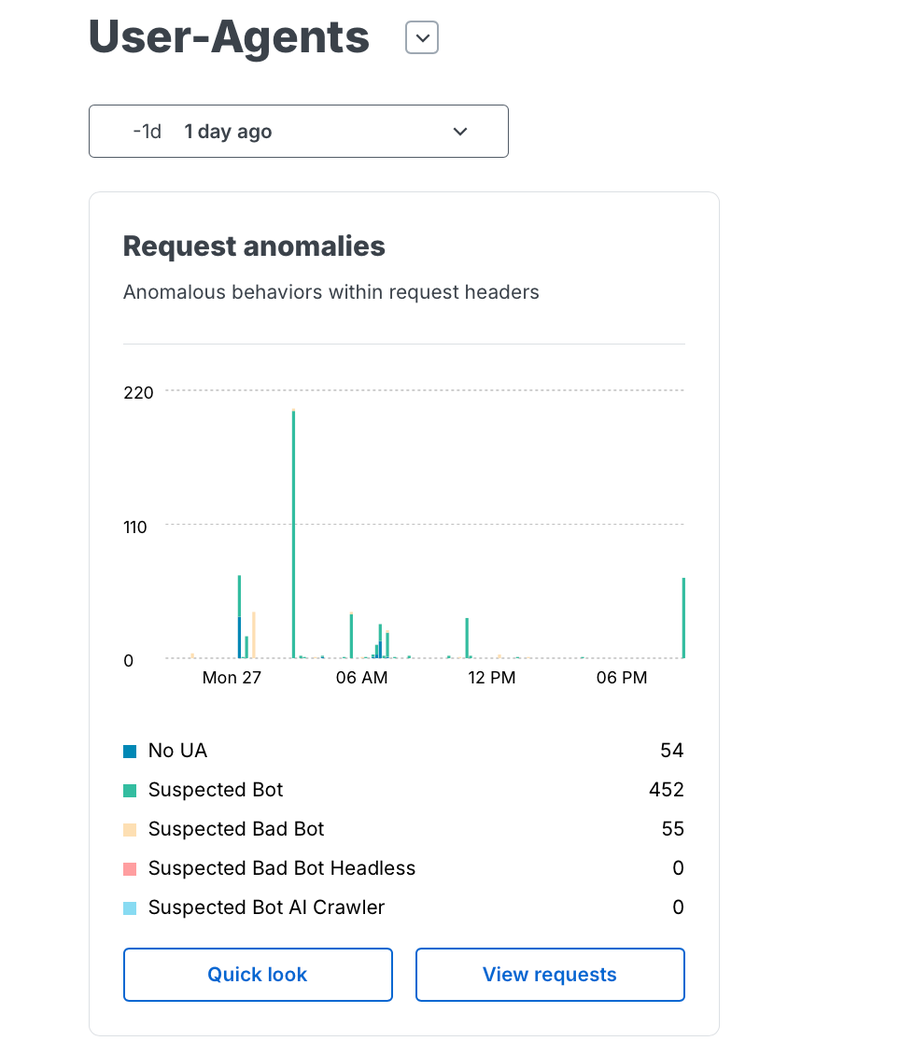
System Signals: The WAF automatically labels suspicious behavior with signals like
deceitful-user-agentorsuspected-bot. It logs and analyzes these requests, allowing you to block suspicious strings directly from the dashboard.
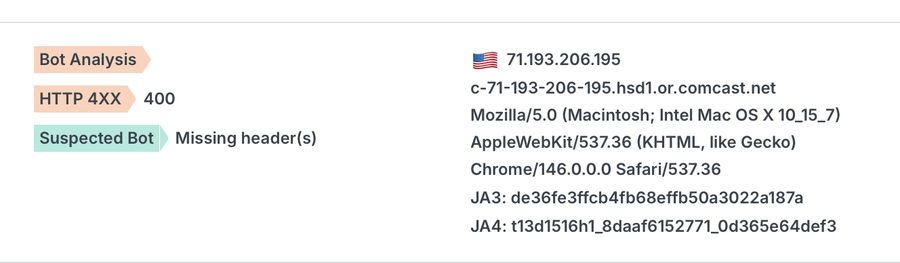
TLS/JA3 Fingerprinting: Fastly identifies clients (such as web browsers, applications, or bots) based on the unique characteristics of their TLS (Transport Layer Security). Unlike the "User-Agent" (UA) string, the TLS implementation is significantly more difficult to impersonate because it's baked into the underlying code library. Refer to TLS fingerprinting in this blog for more details
Behavioral Signals: Fastly’s uses Behavioral Signals to see past spoofed User-Agents. Even if an attacker using
sqlmapmasks their User-Agent, the `TOOL-SQLMAP` signal triggers becausesqlmaphas a distinct behavioral signature.SmartParse Detection: Rather than just checking if a string claims to be Chrome or Firefox, the WAF analyzes request parameters to determine if the traffic is actually an executable attack. Fastly recognizes the tool's specific automated probes and logic patterns
Fastly Detection Implementation Examples
Fastly provides multiple layers of defense to identify and mitigate spoofing. For those who prefer granular control at the edge, Fastly leverages VCL (Varnish Configuration Language) variables to intelligently describe client hardware and software.
By using VCL, you can compare the declared header against the client.browser.name or fastly.bot.name variables, which are populated based on deep packet inspection. When a discrepancy occurs—such as a request claiming to be "Chrome" but lacking Chrome’s specific feature set
Practical VCL Implementation
The following snippet demonstrates how to intercept a request where the declared User-Agent does not match the actual browser characteristics identified by Fastly’s engine.
sub vcl_recv {
  # Check if the attributes contradict the User-Agent header
  if (req.http.User-Agent && !fastly.bot.name) {
    # If the UA claims to be Chrome but the engine identifies it as 'Unknown' or 'Other'
    if (req.http.User-Agent ~ "Chrome" && client.browser.name != "Chrome") {
       # Log the inconsistency and block
       set req.http.X-UA-Spoof = "1";
       error 403 "Forbidden: Browser Inconsistency Detected";    }  }
  # Direct bot identification based on known deceitful signatures
  if (fastly.bot.name == "Deceitful User-Agent" || fastly.bot.is_friendly == false) {    error 403 "Forbidden";  }
}
While VCL provides a solid first line of defense at the edge, Fastly’s Next-Gen WAF elevates detection from simple string matching to behavioral analysis. Its SmartParse technology doesn't just look at the User-Agent; it analyzes the "DNA" of the request. If a request claims to be a mobile Chrome browser but is detected as Suspected Bot or Suspected Bad Bot, the WAF can help Block the request in Actions.
Step-by-Step: Detecting Fake User-Agents via Fastly WAF
To implement a rule that catches spoofed agents using the Signal Sciences console, follow these steps:
Define the Signal: Navigate to Rules > Site Signals and create a new signal named Potential User Agent Spoof.. This acts as a tag for requests that fail your validation logic.
Create a Request Rule: Go to Rules > Site Rules and click Add Site Rule.
Set the Conditions:
Field: User-Agent | Operator: contains | Value: Chrome (Example for targeting Chrome spoofers)
AND * Field: Signal | Operator: equals | Value: Suspected Bot
AND * Field: Signal | Operator: equals | Value: Suspected Bad Bot
Assign the Action: Under "Then," select Type: Block and choose some description as Potential User Agent Spoof..
Review and Deploy: Monitor the "Requests" live tail to ensure legitimate users aren't being caught before moving the rule from "Log" to "Block" mode.
Moving Beyond the Mask
User-Agent spoofing is a constant reminder that in modern web security, you cannot trust identity at face value. Attackers rely on the fact that legacy, regex-based filters look only at what a client claims to be, allowing them to slip past defenses with simple script modifications.
However, true visibility doesn't come from a header string – it comes from behavior. By moving beyond static identification and leveraging the Fastly Next-Gen WAF, you shift the advantage back to the defender. With SmartParse technology, behavioral signals, and TLS/JA3 fingerprinting, you are no longer playing "whack-a-mole" with spoofed strings. Instead, you are identifying threats based on their DNA – their intent, their logic, and their actual behavior on your network.
Ready to see your traffic for what it really is?
Try the Next-Gen WAF: See how your applications handle real-world bot traffic with a free trial or schedule a demo with our team.
Explore Rule Customization: Deepen your defense by learning how to configure granular security policies in our documentation.