
Bénéficiez de toutes les fonctionnalités d’un CDN moderne : une scalabilité transparente, une sécurité intégrée, un contrôle par programmation et une visibilité totale.




Beyond Blocking: Creative Ways to Detect and Hamper Video Piracy
Discover smart ways to mitigate live video piracy, slow down restreamers with clever CDN tricks, and protect your streams.

Restreaming, the practice of hosting someone else’s stream on your own site to profit from advertising without paying for the streaming bandwidth, isn’t a new problem, but it is an increasingly large and sophisticated one, as we saw during the 2026 World Cup.
For large or high-value live events, many of these pirate sites are now at a scale where they operate like real streaming services, with a small window in which to successfully stream an event and a paying customer base that expects the same levels of quality and reliability that they’d get from a legitimate service.
This introduces an interesting new dynamic that we can exploit as part of our anti-piracy toolkit – instead of simply blocking pirate streams and triggering a game of cat and mouse as the pirates shuffle domains, IPs and user accounts to spin up new versions, we can instead look at more non-deterministic ways to degrade their viewer experience and make the stream unwatchable without what’s happening being immediately obvious to the site operators.
Pirate Spotting
We’ll look more into ways of detecting restreaming and narrowing down which user accounts are driving it in a future post, but common ways include combinations of:
URL tokenisation, e.g with CAT tokens
Edge Rate Limiting, using counters to detect excess requests from a particular IP, ASN etc.
JA4 Fingerprinting together with Bot Management to detect automated tooling trying to disguise itself as regular users
Realtime log analysis and anomaly detection, to catch e.g an unusually high amount of traffic from an unexpected region based on content rights or find commonalities between suspicious clients
Assuming you have a way to detect all or a subset of restreaming traffic with a high degree of confidence, we can now get to the fun part of messing with the streams!
Tactic 1: Turtle Mode
In our normal operations, we focus on helping streaming services to scale globally and eliminate any sources of buffering in video playback. Today though, we get to do the opposite.
Fastly offers a VCL variable client.socket.pace, that lets you set the rate we’ll stream data back to the end user at. This lets you do something like:
if (var.traffic_is_piracy) {
  # Stream the data back at 128 kilobytes / second
  set client.socket.pace = 128;
}
Suddenly the viewer is transported back to 1995, getting a few chunks of video every minute and hoping nobody tries to use the house phone and interrupts their connection.
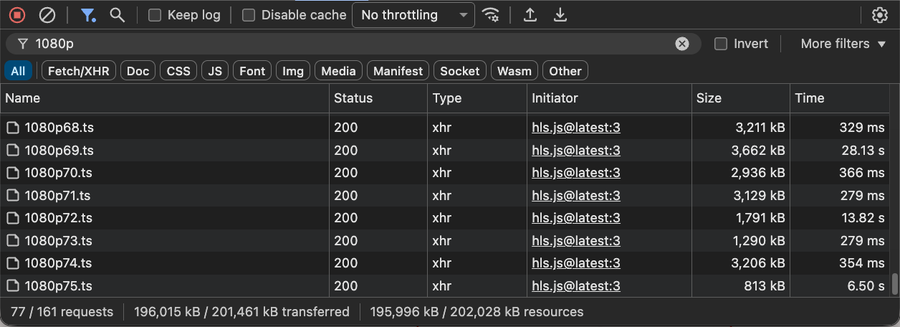
The following example applies the slowdown for every third chunk of video. Test it out and try to imagine this was a tense boxing match rather than a large animated bunny.
You can also open your browser’s network tab and see the intermittent slowness in action:
Tactic 2: Getting Artistic
Similarly to inducing buffering, we can also degrade the video visually in ways we would normally try to avoid.
In ABR streaming, we produce multiple copies of a video at different quality levels and then let the player choose whatever quality is the highest a viewer’s connection can handle. This quality choice can move up and down during a stream to try and avoid buffering and maintain the optimal quality as conditions change.
But what if we intentionally served pirate streams with the lowest possible quality? What if we went further and produced an even lower quality version that only got served to pirates?
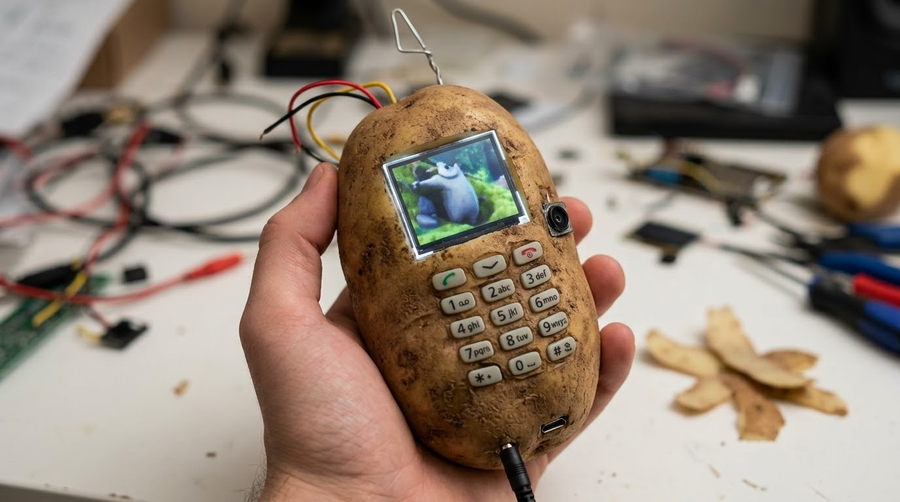
Before we jump into our journey to potato quality video, let’s have a quick refresher on how video segment URLs and CDNs work.
Normally, a video provider will create similar URLs for each segment of video / quality level, e.g:
/video/1080p/segment-2.ts/video/720p/segment-2.ts/video/480p/segment-2.ts/video/1080p/segment-3.ts/video/720p/segment-3.ts/video/480p/segment-3.ts
While these will often correspond to a similar file structure in storage somewhere, they don’t have to and might point to e.g. an on-the-fly transcoding service that will quickly encode the correct segment at the time it’s requested and try to avoid upfront transcoding costs for segments or videos that are never watched.
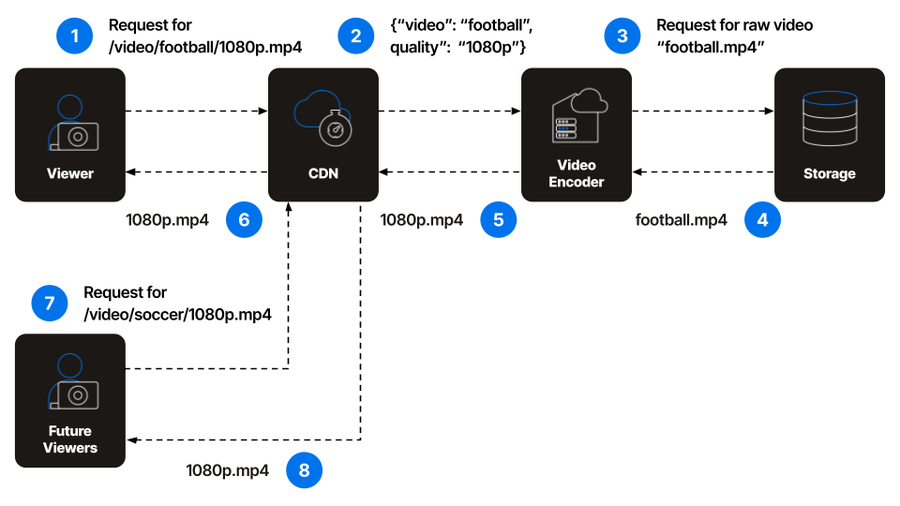
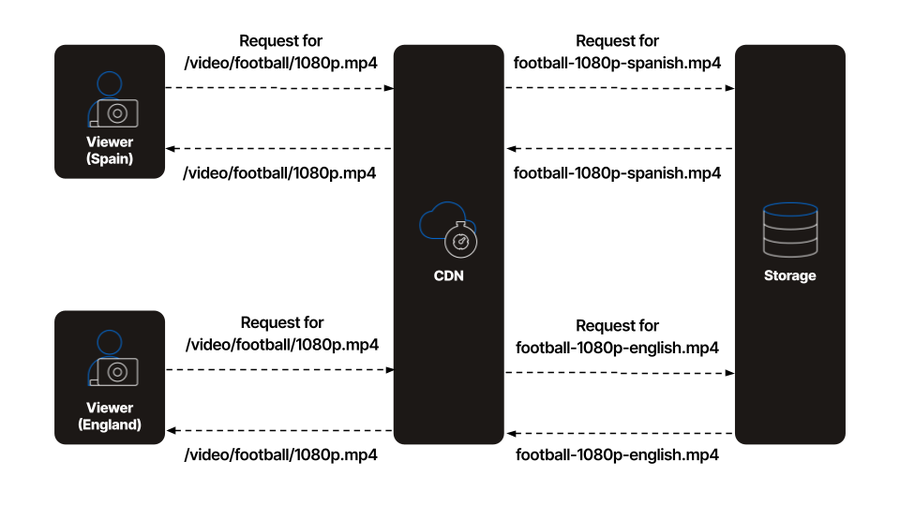
There’s not even any guarantee that a URL like /video/1080p/segment-2.ts needs to refer to the same file for each user! We might try to be clever on the backend and route that same URL to versions of the segment with different audio language tracks based on detecting the user’s country code at the CDN (sidenote: please don’t do this!).
We can use that to our advantage here - first, we ask ffmpeg to produce one 1080p rendition and one additional one in an unwatchably low resolution:
ffmpeg -i input.mp4 \
  -filter_complex "[0:v]split=2[v1][v2]; [v1]scale=1920:1080[v1out]; [v2]scale=-2:60,fps=5[v2out]" \
  -map "[v1out]" -c:v:0 libx264 -b:v:0 5000k \
  -map "[v2out]" -c:v:1 libx264 -b:v:1 20k \
  -map 0:a:0 -c:a aac -b:a 128k \
  -force_key_frames:v "expr:gte(t,n_forced*4)" \
  -f hls \
  -hls_time 4 \
  -hls_list_size 0 \
  -hls_playlist_type vod \
  -master_pl_name master.m3u8 \
  -var_stream_map "v:0,agroup:audio,name:1080p v:1,agroup:audio,name:potato a:0,agroup:audio,name:audio" \
  %v.m3u8
Now we just need a simple VCL switch to decide which version to serve
if (var.traffic_is_piracy) {
  set req.url = std.replace(req.url, "1080p", "potato");
}
Now, viewer-facing URLs will always look like /video/1080p/segment-<number>.ts, but will get sent to the backend as a request for /video/potato/segment-<number>.ts for pirate viewers.
To see it in action, check out the following video - to simulate piracy detection, I’ve put a 50/50 randomness condition in place of an actual piracy check and so you should see approximately half the segments as normal and half of them as the degraded version.
All of the examples on this service are running live on real Fastly services. We’ve used randomness in place of a piracy check, so you can reload the page or open two side by side and see how the bits of video that are degraded change every time, all without requiring extra trips back to the origin.
There’s also no way to detect what’s going on from the manifest, which looks the same for all viewers (feel free to open up your browser’s network tab and check!):
#EXTM3U
#EXT-X-VERSION:3
#EXT-X-TARGETDURATION:4
#EXTINF:4.000000,
segment-0.ts
#EXTINF:4.000000,
segment-1.ts
#EXTINF:4.000000,
segment-2.ts
Tactic 3: Manifest Manipulation
If producing additional renditions or modifying the origin isn’t feasible then an option that can be done entirely at the CDN layer is to manipulate the manifests using Fastly Edge Compute to serve some sort of alternate content to pirate users.
There are many ways to achieve this, such as by redirecting the player with an Server Guided Ad Insertion interstitial manifest, but in the example below we take advantage of the HLS #EXT-X-DISCONTINUITY tag to periodically insert our content inline with the stream. The green text is what most users’ players would see and the red is what would only be inserted for pirates:
#EXTM3U
#EXT-X-VERSION:3
#EXT-X-TARGETDURATION:4
#EXT-X-MEDIA-SEQUENCE:100

# The viewer starts watching the legitimate main event
#EXTINF:4.000,
main-event-100.ts
#EXTINF:4.000,
main-event-101.ts

# The CDN dynamically inserts this tag to tell the player that the video encoding / resolution / timestamps are about to change
#EXT-X-DISCONTINUITY

# The penalty content plays
#EXTINF:4.000,
rickroll-01.ts
#EXTINF:4.000,
rickroll-02.ts
#EXTINF:4.000,
rickroll-03.ts

# Another discontinuity is required to safely transition back to the real content
#EXT-X-DISCONTINUITY

# The viewer is dropped back into the main event, but they've missed 12 seconds
#EXTINF:4.000,
main-event-105.ts
#EXTINF:4.000,
main-event-106.ts
There’s a lot of scope for getting creative here – you could just serve Rick Astley clips, but in general we’ve seen Fastly users have success with serving content that’s as close as possible to the actual content, for instance:
A match between the correct soccer teams, but last year’s version
An endless loop of the Boxing undercard fights and never the main event
Infinite pre-roll adverts
For audio streaming services, a different song by the same artist
This is especially effective against scraping, where the switch might not be noticed until much later
Advanced Mode: Get Random
Another technique for prolonging the period before the above techniques are detected while maximising pirate user churn is to insert some non-determinism, such as by only impacting a certain percentage of segments, devices, regions etc. at any given point.
If we put all of this together at once, we get the following cursed video - enjoy this feast of randomised video degradation, buffering and non-sequiters that would make even the most hardened pirate cry:
Making Piracy Painful (and Unprofitable)
Livestream piracy is a complex intersection of economics, psychology and technology and preventing it can involve tackling any and all of those axes. For high-value live video piracy, a bad viewer experience might mean missing key moments in a one-off event. The more often that happens and the more frustrating the experience, the more likely viewers are to “churn” back to legitimate services.
Ready to protect your live streams with smarter, more creative defenses? Talk to our experts to see how Fastly can help you stop pirates in their tracks.