

容易なスケーリングや組み込みのセキュリティから、プログラマブルな制御、包括的な可視性まで、最先端の CDN に必要なあらゆる機能を提供します。




Fastly Compute の AI エージェント : その仕組みと安全性
Fastly Compute で AI エージェントを実行することにより、エッジを活用して低レイテンシを実現し、WebAssembly サンドボックスを活用してエンタープライズレベルの速度とセキュリティを実現する方法をご紹介します。



Fastly Compute は、AI ワークロードを処理することが可能であるだけではありません。エッジの低レイテンシと当社の環境の厳密な分離を本質的に活用するため、非常に効果的です。このブログ記事では、LLM API を使用して Fastly Compute サービスにエージェント機能を追加するいくつかのパターンを分析し、当社の Compute プラットフォームが、WebAssembly サンドボックスでコードを実行することによりエージェントを最適な速度とエンタープライズクラスのセキュリティで実行する方法について説明します。
AI エージェントのフィードバックループの設計
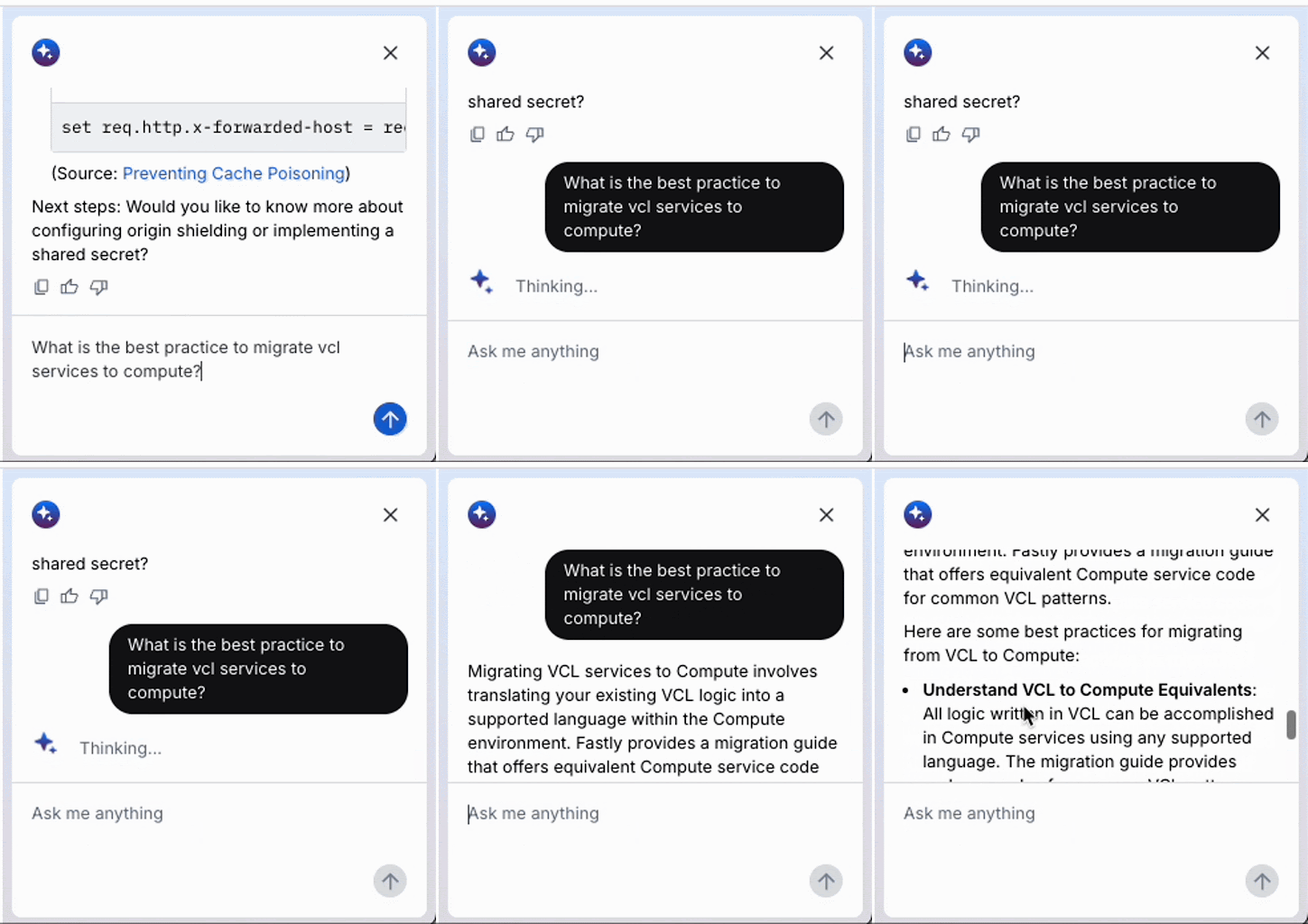
このアニメーション GIF は、Fastly コンソールで実行されている最近リリースされた AI アシスタントを記録したものです。このような AI ベースのチャットでプロンプトを出したとき、AI エージェントが「考える」間に待たされるのはよくあることですが、モデルが答えを出す前により深く考えるテストタイムコンピューティング (TTC) の代わりに、LLM API コールの結果をフィードバックとして使用して目標を達成するエージェントを構築すれば、この種の思考プロセスを実装することができます。この方法は一般にエージェントループと呼ばれます。このプロセスでは、目的が正常に達成されるまで、推論、計画、ツールを使用した行動、結果の観察などの一連のステップが継続的に繰り返されます。
このフィードバックループの実行フローを以下に示します。LLM がプロンプトに対する回答を即座に生成する単一の交換では、望ましい応答が得られない場合がよくありますが、このメカニズムにより、エージェントはステップ (1) ~ (3) を繰り返し実行および評価するループを自律的に継続することができるため、精度が向上した最終結果を得ることができます。
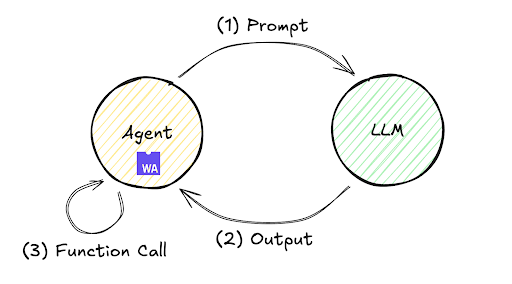
このループは、ローカルのインフラストラクチャからリモートサーバーまで、さまざまな環境にデプロイできます。最小限の実装で Fastly Compute を使用したリモート環境内の処理フローを見てみましょう。たとえば、Fastly Compute JavaScript SDK なら、次に示す実装が可能になります。このコードは、TypeScript Starter Kit を $npx fastly compute init で初期化し、src/index.ts を次のコードに置き換えることで検証できることに注目してください。
addEventListener("fetch", (event) => event.respondWith(handleRequest(event)));

async function handleRequest(event: FetchEvent) {
 let payload = {
   model: 'gpt-5.2',
   messages: [{role: "user", content: "what's the weather today?"}],
   tools: [{ "type": "function", "function": {
               "name": "get_weather",
               "description": "retrieve weather forecast",
               "parameters": {}}}]}
 while(true){ // Agent loop begins
   let res = await (await fetch("https://<LLM_API_ENDPOINT>/chat/completion", {
     method: "POST",
     headers: new Headers({
       "Content-Type": "application/json",
       "Authorization" : "Bearer <YOUR_ACCESS_TOKEN>",
     }),
     body: JSON.stringify(payload)
   })).json();
   if (res.choices[0].finish_reason != "tool_calls") {
     return new Response(JSON.parse(res.choices[0].message.content))
   }
   if (res.choices[0].message.tool_calls != undefined) {
     for (const toolCall of res.choices[0].message.tool_calls ) {
       if (toolCall.type === "function") {
         payload.messages.push({
           role: "user",
           content: "{\"weather\":\"windy and rainy\"}" // pseudo result
         });
       }
     }
   }
 }
}
このコードの実行は次の高レベルフローに従います。
プロンプト「what's the weather today?」を LLM API に送信します。
LLM API は、
get_weatherツールを実行するための命令を返します。ダミー値
「windy and rainy」を暫定的な結果としてプロンプトに追加し、LLM API (エージェントループ) を再呼び出します。LLM API から完了シグナル (たとえば、
finish_reasonとして stop が返されます) を受信し、最終結果を表示します。
このプログラムを私のラボ環境で gpt-5.2 モデルを使って実行したところ、ステップ4で次の結果が得られました。
「It’s windy and rainy today. If you’re heading out, grab a waterproof jacket and umbrella, and watch for slick roads and strong gusts. Want an hourly breakdown or tips for commuting or outdoor plans? (今日は風が強く雨が降ります。外出する場合はレインコートと傘を持って行き、滑りやすい道路や強い突風に注意してください。時間ごとの内訳や通勤/アウトドアプランのヒントが欲しいですか?)」
この反復的なエージェントループから得られる結果は、前述のフィードバックループ (最新のチャットインターフェイスの「Thinking... (考え中...)」インジケーターの背後で頻繁に使用される処理技術) の例です。
進化し続けるエージェントループ
エージェントループは以前から注目を集めていましたが、今年は MCP (Fastly MCP サーバーなど) のような外部ツールへのインターフェイスやツールコールの登場により、さらなる注目を集めています。この進化を単純化したのが下の図です。
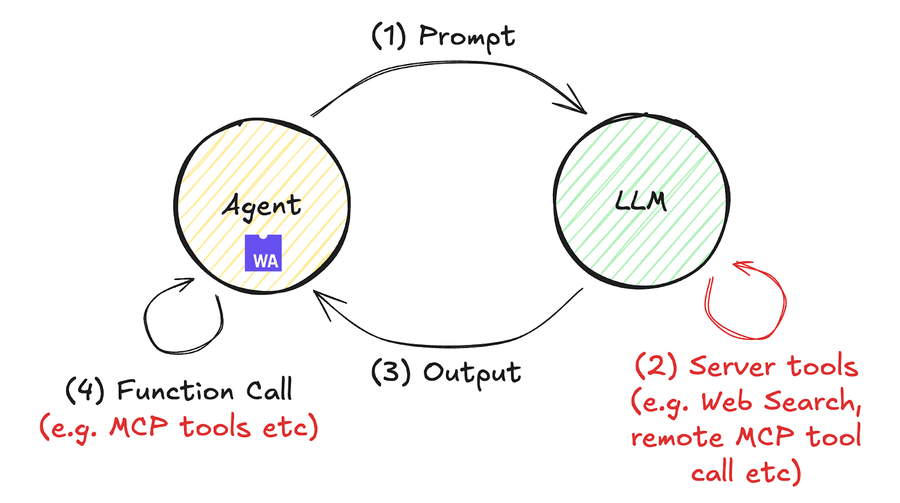
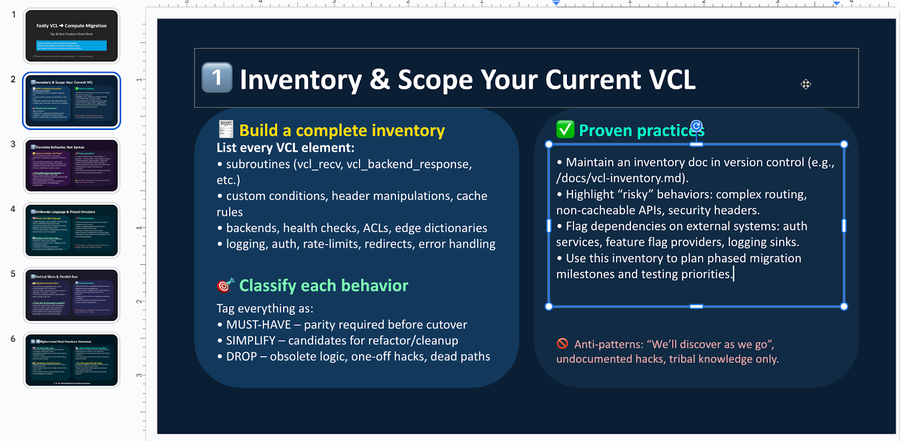
リモートツールコールを含む Compute コード処理の具体的な例を次に示します。この例では、OpenAI のレスポンス API (5月に発表) を使用します。これはリモートツールコールを可能にします。Anthropic のメッセージ API などでも同様の操作が可能です。このコードは次の手順で実行できます。約60行の JavaScript コードには、ドキュメント検索結果に基づいて Fastly VCL サービスを Compute に移行し、最終的に編集可能な PowerPoint ファイル (PDF ファイルではない) を出力するためのベストプラクティスをまとめています。
$ mkdir compute-agent-demo && cd compute-agent-demo
$ npx fastly compute init -l javascript -i
$ npm install pptxgenjs openai hono @fastly/hono-fastly-compute abortcontroller-polyfill
$ curl -s "https://gist.githubusercontent.com/remore/25a1638a3a2183daa609044cfa1ce6f9/raw/818322d634d59c10950878932517c4173b746dd3/index.js" > src/index.js
$ vi src/index.js # Put your API Token and rmeote MCP server address
$ fastly compute serve
実際の PowerPoint ファイルの出力例は次のようになります。LLM の情報要約機能とコード生成機能を活用して、目的に合った説得力のあるコンテンツを含む編集可能な PowerPoint バイナリファイル (.pptx) を生成できるようになりました。
このコードの例と前の例の大きな違いは、プログラム内に while() 文がないことです。今回はエージェント AI ループが LLM API 側で実行されるため、Compute コード (エージェントとして機能) は while() ループを実装しません。これによりプログラムの可読性が向上します。これは、最近の進歩により AI ワークフローの実装が大幅に容易になる環境が整備されたことを示しています。
const bestPractices = await callLLM(
    'What are the best practices to migrate a fastly vcl service to compute? Outline ten practices and give each a summary of at least 300 characters.',
    [{
      "type": "mcp",
      "server_label": "fastly-doc-search",
      "server_url": "https://xxxxxxx.edgecompute.app/mcp",
      "require_approval": "never",
    }]
)ちなみに、このデモは、上記のコードに示されるように、edgecompute.app ドメインの Compute 上で動作するリモート MCP サーバーと統合して実装しました。これは、callLLM() 関数を呼び出す場合のものです。どのリモート MCP サーバーでも互換性がありますが、私は Fastly Compute で実装された MCP サーバーを使用しました。これは、LLM API に最も近いデータセンターから常に呼び出されるエッジサーバーレスプラットフォームのメリットを活用するためです。これにより、ツールコールのレイテンシが最小限に抑えられ、Time to First トークン (TTFT) の最適化に貢献します。低レイテンシでのエッジ実行やストリーミング応答サポートなどの Fastly Compute の機能は、AI エージェント開発を強力にサポートします。Compute を使用して MCP サーバーを実装する方法の詳細については、私の以前のブログを参照してください。
Fastly のプラットフォームと Wasm サンドボックスが AI ワークロードを保護する方法
最後に、信頼できる AI の鍵となるセキュリティについて触れておきます。AI エージェントにどのような権限を付与し、それをどのように管理するかを決定することは、開発者にとって大きな懸念事項でした。Claude Code、Gemini CLI、Codex などのコーディングエージェントを使用する際に開発を加速するための許容モデルの設計について議論されることが多いですが、エンタープライズ AI ワークフローを設計するには、制限的な権限設計の観点も必要です。
Fastly Compute を利用することで、プログラムは WebAssembly ランタイムサンドボックス分離や、明確なセキュリティ境界内での線形メモリ境界チェックなどのメモリ安全性機能のメリットを簡単に享受できます。たとえば、上記の例で実装されているように、AsyncFunction() コンストラクターを使用した動的なコード実行は、多くの JavaScript ランタイムでは一般に脆弱性のリスクとアンチパターンと見なされます。Fastly Compute でも慎重な使用が必要ですが、このプラットフォームはファイルシステムアクセス、ネットワーク I/O、外部コマンド実行機能を本質的に欠いた隔離された WebAssembly 環境で動作するため、エージェントは攻撃面を最小限に抑えた自律処理を行うことができます。
それだけではありません。Fastly Compute プラットフォームが提供する豊富なホストコールには、さまざまなセキュリティへの配慮も含まれています。たとえば、バックエンドのフェッチ/送信コールの数を制限すると、過剰な外部リクエストの発行を防ぐのに役立ちます。さらに、当社の「静的バックエンド」メカニズムは、事前定義された外部サーバーへのトラフィックを制限し、エージェントが不要/不明な外部サーバーに HTTP リクエストを送信するのを防ぎます。
 // example of dynamic backend
 fetch("https://example.com/some-path")

 // example of static backend, restricting traffic to pre-defined external servers
 fetch("https://example.com/some-path", {backend: "example-com"})
このメカニズムは、AI ワークフローを悪意のある実行から保護するだけでなく、「動的バックエンド」と呼ばれる機能を介して、より広範な挙動を選択的に許可することも可能にします。Fastly Compute は、安全なインフラストラクチャ内で Wasm モジュールとして実行されるプログラムに対してきめ細かな機能割り当てを可能にすることで、AI ワークフローにおけるセキュリティのシームレスな実装を促進します。
標準化された技術と仕様を活用したコントロールの確保
このブログ記事では、Fastly Compute に AI エージェントを効果的に実装するためのいくつかの方法を紹介しました。AI エージェントは、生産性と運用効率を大幅に向上させるために不可欠なものになっています。パフォーマンスとセキュリティのバランスが取れたエンタープライズレベルの環境である Fastly Compute を活用すれば、AI の能力を最大限に活用するエージェントを開発することができます。このブログ記事が、より優れた AI エージェントの開発に役立つことを願っています。当社のフォーラムでのコミュニケーションに参加して、構築中の内容をお知らせください。