About client challenges
Client challenges are security tasks that verify users are human or accessing your web application through a legitimate browser. To minimize disruption to your application's user experience, you can configure these challenges to run invisibly in the background using non-interactive methods (e.g., JavaScript proof-of-work) and only present interactive challenges (e.g., CAPTCHA) when suspicious activity is detected. Alternatively, you can choose to serve only non-interactive or interactive challenges. Depending on the type of challenge you choose, challenges can be embedded within a page of your web application or served on an interstitial page.
Prerequisites
Before setting up client challenges, be sure you have the following prerequisites in place:
- You must purchase Bot Management, which is not available for the Essential platform.
- You must enable Bot Management on each Fastly service where you intend to use the client challenges.
Limitations and considerations
When working with client challenges, keep the following things in mind:
- Client challenges are issued to fully-qualified domain names (FQDN). If your service includes subdomains that shouldn't receive challenges (e.g., api.example.com), be sure to restrict the challenge to the desired subdomains when creating the request rule that adds the challenge.
- To exclude a bot from client challenges when you want it to access your website, you must include that bot in a rule condition (e.g., set up a rule condition excluding clients with the
VERIFIED-BOTsignal from client challenges). - Don't manipulate the
Set-Cookieresponse header or theCookierequest header in VCL, as these headers are essential for identifying initiated and solved challenges via the_fs_ch_st_<RANDOM STRING>and_fs_ch_cp_<RANDOM_STRING>cookies.
Getting started with client challenges
To start using client challenges, complete the following steps:
- Choose the type of challenge that you'd like users to complete.
- Create your first challenge by following the Serving challenges with interstitial pages or Embedding challenges in pages guide.
- (Optional) Block requests tagged with invalid challenge tokens.
Challenge types
Depending on the type of challenge you choose, challenges can be embedded within a page of your web application or served on an interstitial page.
HINT: Have a React or single-page application? Embed a dynamic challenge within your web application. React and single-page applications don't handle interstitial pages well.
| Challenge type | Definition | Interstitial page challenges | Embedded challenges |
|---|---|---|---|
| Dynamic challenge | Allow Fastly to automatically choose the most appropriate client challenge based on the situation. These may include Private Access Tokens (PATs), non-interactive challenges, and interactive challenges if suspicious activity is detected during the initial check. | To serve a dynamic challenge to an interstitial page, create a rule with the Dynamic challenge action. | To embed a dynamic challenge on a page in your web application, modify the HTML of the page. |
| Non-interactive challenge | Leverage what is called a JavaScript proof-of-work and ask a client to prove that it is running a JavaScript-compatible browser by solving what is essentially a JavaScript math problem. | To serve a non-interactive challenge to an interstitial page, create a rule with the Browser challenge action and the Allow Interactive switch disabled. | Not supported. |
| Interactive challenge (sometimes called CAPTCHA challenges) | Prompt a client with a random alphanumeric string and ask the client to enter that string into the presented box to prove that the person requesting the information is human. | To serve an interactive challenge to an interstitial page, create a rule with the Browser challenge action and the Allow Interactive switch enabled. | Not supported. |
How it works
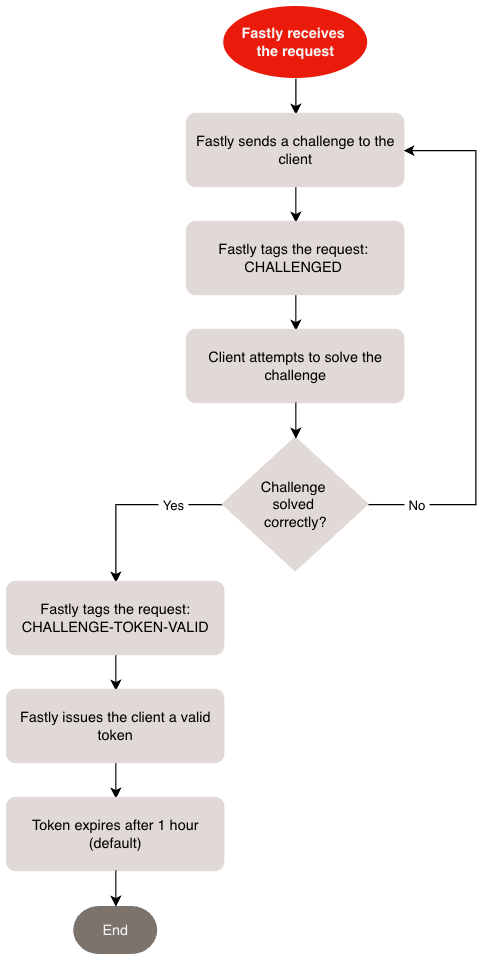
When a client is sent a challenge, we tag the associated request with the Challenged Request (CHALLENGED) signal. If the client fails to solve the challenge, we send the client another challenge. If the client solves the challenge, we tag the request with the Challenge Token Valid (CHALLENGE-TOKEN-VALID) signal and issue the client a token, which it stores as a browser cookie. The token defaults to a 1 hour expiration.
HINT: Want to validate this token on subsequent requests and block requests with invalid tokens? Check out our Blocking requests with invalid challenge tokens guide.